




Product Overview
Transform complex ideas into clear, professional visualizations with this Microsoft Visio 2024 Professional product key from YourSoftwareKeys.com. Designed for business analysts, IT professionals, engineers, and project managers, this genuine license provides the complete desktop solution for creating advanced diagrams, flowcharts, network maps, and floor plans. This is a perpetual, one-time purchase license—no Microsoft 365 subscription required—giving you permanent access to the industry’s most powerful diagramming tool with all Professional edition features.
✅ Visio 2024 Professional Exclusive Features:
- Advanced Templates & Shapes: 60+ starter diagrams and thousands of professional shapes
- Data-Linked Diagrams: Connect diagrams to Excel, SQL Server, SharePoint, and Azure data sources
- Real-Time Co-authoring: Collaborate simultaneously on Visio files stored in OneDrive or SharePoint
- Advanced Process Mapping: BPMN 2.0 compliance, Six Sigma, and SWOT analysis templates
- Network & Rack Diagrams: Automated network discovery and equipment mapping
- Floor Plan & Space Planning: Accurate scaled drawings with furniture and building elements
- Org Chart Wizard: Automatically generate org charts from Excel or Azure Active Directory
- Custom Stencil Creation: Build and share custom shape libraries across your organization
🆚 Visio 2024 Professional vs. Standard vs. Visio Plan 2:
| Feature | Visio 2024 Standard | Visio 2024 Professional | Visio Plan 2 (365) |
|---|---|---|---|
| Advanced Templates | Basic Only | ✅ 60+ Professional | ✅ Included |
| Data Linking | ❌ Not Included | ✅ Excel, SQL, SharePoint | ✅ Included |
| Co-authoring | ❌ Not Included | ✅ Real-time Collaboration | ✅ Included |
| Network Diagrams | Basic Shapes | ✅ Automated Discovery | ✅ Included |
| Org Chart Wizard | Basic | ✅ AD & Excel Import | ✅ Included |
| Licensing Model | One-Time Purchase | ✅ One-Time Purchase | Subscription Only |
| Cost Over 3 Years | $XXX | $XXX | $XXX+ (Recurring) |
🎯 Professional Use Cases & Industries:
- IT & Network Administrators: Network diagrams, rack layouts, system architecture
- Business Process Analysts: Flowcharts, swimlane diagrams, BPMN process maps
- Engineering Teams: Circuit diagrams, HVAC plans, mechanical drawings
- Project Managers: Timelines, Gantt charts, PERT charts, project roadmaps
- Facility Managers: Office floor plans, evacuation routes, space utilization
- HR & Organizational Development: Interactive org charts, reporting structures
- Consultants & Architects: Client presentations, system proposals, site plans
- Software Developers: UML diagrams, database models, user interface flows
🔗 Key 2024 Enhancements & Integrations:
🤝 Modern Collaboration
- Real-time co-authoring with teammate presence indicators
- Comments and @mentions directly on diagram elements
- Version history for tracking changes and restoring previous versions
📊 Data Visualization
- Live data linking to Excel, SQL Server, and Azure services
- Automatic diagram updates when source data changes
- Data graphics to visualize metrics directly on shapes
☁️ Cloud & Enterprise Integration
- OneDrive and SharePoint Online integration
- Azure Active Directory synchronization for org charts
- Microsoft Teams integration for diagram sharing and collaboration
🛠️ Productivity Features
- Enhanced ink-to-shape conversion for touch devices
- Improved alignment and layout tools
- Accessibility checker for inclusive diagram design
- SVG export for web and application development
💻 System Requirements:
- Operating System: Windows 11 or Windows 10 (version 1809 or later)
- Processor: 1.6 GHz or faster, 2-core
- Memory: 4 GB RAM minimum (8 GB recommended)
- Storage: 4 GB available disk space
- Display: 1280 x 768 screen resolution (1920 x 1080 recommended)
- Graphics: DirectX 9 or later with WDDM 1.0 driver
- Additional: .NET 3.5 and 4.8 required
📦 What You Receive:
- Genuine Microsoft Product Key – Retail license for Visio 2024 Professional
- Instant Digital Delivery – Key emailed within 5 minutes, 24/7/365
- Official Download Links – Direct access to Microsoft Visio 2024 Professional installer
- Comprehensive Guide – Installation, activation, and getting started instructions
- Template Pack Bonus – Additional professional diagram templates (PDF download)
- Support Access – 90 days of installation and troubleshooting assistance
❓ Frequently Asked Questions:
Q: Is this Visio 2024 Professional a subscription?
A: No, this is a perpetual, one-time purchase license. You pay once and own it forever with no recurring fees.
Q: Can I upgrade from Visio 2016, 2019, or 2021?
A: Yes, you can perform an in-place upgrade if you have a previous perpetual version of Visio.
Q: Does Visio 2024 Professional work with Office 2021 or Microsoft 365?
A: Yes, it integrates seamlessly with Office 2021, 2019, and Microsoft 365 applications.
Q: How many computers can I install this on?
A: The license allows installation on one primary computer and one secondary device (like a laptop) for the same user.
Q: What file formats does Visio 2024 support?
A: VSDX (native), VSD (legacy), PDF, PNG, JPEG, SVG, HTML, and DWG/DXF (import).
Q: Can I use the web version with this license?
A: No, the web version (Visio for the web) requires a Visio Plan 2 subscription. This is desktop software only.
Q: Do you offer volume discounts for teams?
A: Yes, contact us for pricing on 5+ licenses. We offer tiered discounts for enterprise purchases.
Q: What’s the support lifecycle for Visio 2024?
A: Mainstream support until 2029, with extended security updates available through 2032.
Step-by-Step Guide to Download Visio Professional 2024
Step 1: Purchase or Access Your Visio Product Key
To start, you need a valid product key. Buy it from trusted resellers like Yoursoftwarekeys.
Step 2: Sign in to Your Microsoft Account
Go to setup.office.com and sign in with your Microsoft account. If you don’t have one, create an account.
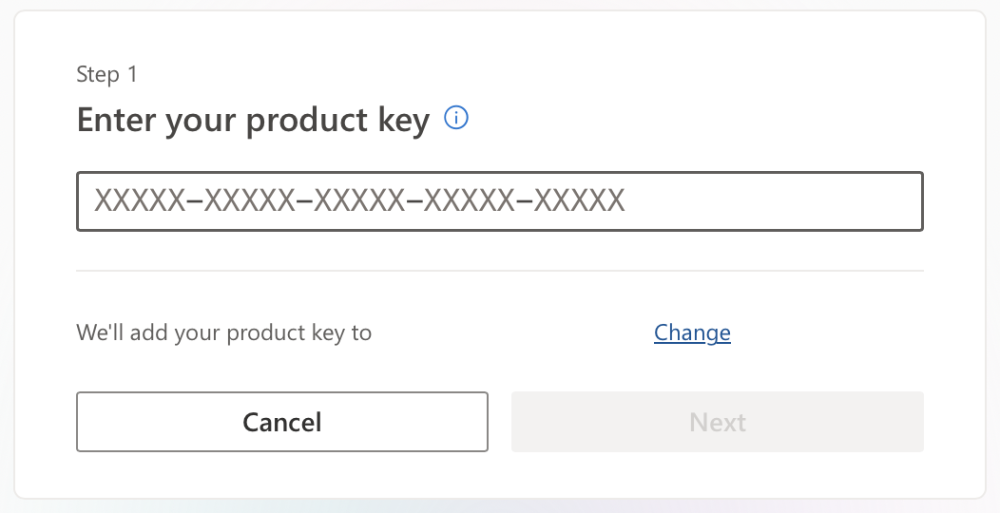
Step 3: Enter Your Product Key
Input your product key and click ‘Next’ to move to the download page.
Step 4: Download Visio Professional 2024
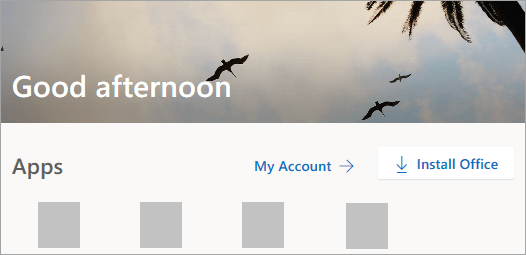
Go to www.office.com and if you haven’t signed in yet, click on Sign in. Then, from the Microsoft 365 Homepage, choose ‘Install Office.’
In the account.microsoft.com portal, click on Subscriptions in the top menu. Find the version of Visio you wish to install and click Install. The download for Visio should start now.
Installing Visio Professional 2024
Step 1: Run Installation
Open the downloaded file and allow installation when prompted.
Step 2: Complete Installation
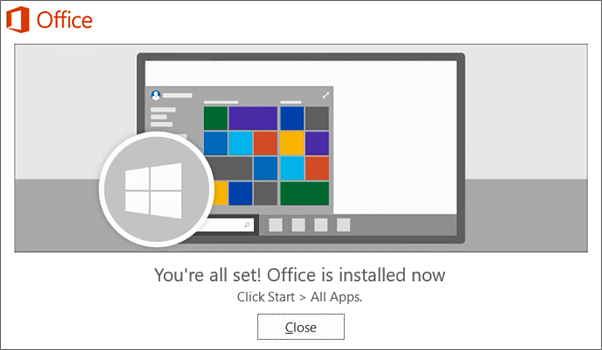
Wait for the installation to complete, and then open Visio from your Start menu.
Activating Visio Professional 2024
Follow the guidelines in the window to locate Visio. For example, based on your Windows version, click Start and then scroll through your applications to find Visio.
Troubleshooting Common Issues
Problem 1: Download Errors
If you encounter issues during the Visio Professional 2024 download, check your internet connection and disable VPNs or firewalls that may interfere.
Problem 2: Installation Failures
Ensure your device meets system requirements and has enough storage space.
Problem 3: Activation Issues
Double-check the product key and sign in with the correct Microsoft account. If issues persist, contact YourSoftwarekeys Support
FREQUENTLY ASKED QUESTIONS (FAQS)
1. Where do I get my Visio 2024 Professional product key?
After you purchase the product from YourSoftwareKeys.com, your unique product key will be delivered to you via email.
2. How do I download and install Visio 2024 Professional?
The steps to download and install the software are straightforward:
- Sign In: Go to the official Microsoft portal at
setup.office.comand sign in with your Microsoft account. - Enter Key: Input the 25-character product key you received by email.
- Download: Follow the on-screen prompts to download the installer. (Note: The product page also mentions downloading from
www.office.com. For a product key purchase,setup.office.comis the correct starting point.) - Install: Run the downloaded file and follow the installation wizard to complete setup on your device.
3. How do I activate Visio 2024?
Activation is typically handled during the installation process when you sign in with your Microsoft account and enter the product key. If you need to activate later, you can usually do so by opening Visio, going to File > Account, and selecting the option to sign in or enter a product key.
4. How can I check my activation or subscription status?
You can verify your license status from within the Visio application:
- Open Visio 2024.
- Click on File in the top-left menu, then select Account.
- Under the Product Information section, you will see the status of your subscription and activation details.
5. What should I do if I have activation or installation problems?
The product page suggests the following troubleshooting steps:
- For download errors, check your internet connection and temporarily disable any VPNs or firewalls that might be interfering.
- For installation failures, ensure your computer meets the system requirements and has sufficient storage space.
- For activation issues, double-check that you entered the product key correctly and are signed in with the right Microsoft account.
- If problems persist, you should contact YourSoftwareKeys Support for assistance with your purchase.
Summary Table: Visio 2024 Professional FAQs
| FAQ Topic | Key Action / Solution |
|---|---|
| Getting the Key | Delivered via email after purchase. |
| Download & Install | Use setup.office.com, sign in, enter key, and run installer. |
| Activation | Usually automatic during sign-in and key entry in setup. |
| Check Status | Go to File > Account within the Visio app. |
| Troubleshooting | Check internet/requirements, confirm key, or contact YourSoftwareKeys support. |

Reviews
There are no reviews yet.