

How to Activate Microsoft Office: Easy. Follow these steps: Guide for 2026
Let’s be honest—you didn’t buy Microsoft Office to become an activation expert. You bought it to write documents, create spreadsheets, and make presentations without seeing those annoying “Unlicensed Product” messages that pop up at the worst possible moments (usually when you’re trying to impress your boss).
If you’re looking at activation warnings or wondering why some features are locked, you’re in the right place. This simple and easy guide from YourSoftwareKeys.com will walk you through every legitimate way to activate Microsoft Office. We’ll help you choose the right product key and make sure you’re up and running quickly.
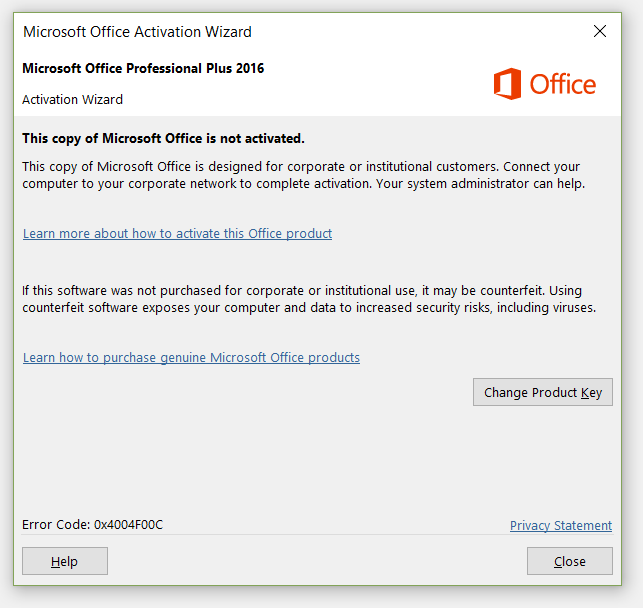
Why is activation important?
That “Activate Office” notification isn’t just there to bother you—it’s actually protecting both you and Microsoft. Think of activation like verifying your car’s registration. It confirms your software is genuine and hasn’t been copied illegally and ensures you get all the features you paid for.
Here’s what happens when you properly activate Office:
Full Feature Access: Without activation, you’re essentially using Office in “reduced functionality mode.” You can view documents, but creating or editing them is limited. You can use the 30-day trial, but once the trial period ends, your Microsoft Office will be limited, and you won’t be able to use it until activated
Security Updates: Microsoft releases critical security patches regularly. Unactivated Office might miss these updates, leaving your computer vulnerable. According to Microsoft’s own Security Intelligence Report, unpatched software remains one of the top security risks for businesses and individuals.
No More Annoying Pop-ups: The constant reminders disappear, letting you focus on actual work instead of activation warnings.
Access to Microsoft Support: If something goes wrong with genuine software, you can actually get help from Microsoft.
What You Need Before Starting: The 3 Essential Items
Before we jump into activation methods, gather these three things:
Your Product Key: This 25-character code looks like this:
XXXXX-XXXXX-XXXXX-XXXXX-XXXXX. It’s your golden ticket. Don’t have a key yet? No worries, get the latest Office 2024 Pro Plus Product keyA Microsoft Account: For most modern Office versions like Office 365, you’ll need one. Don’t have one? You can create it during setup.
The Right Office Version: Make sure you’re trying to activate the same version as your product key (Office 2021, 2019, Office 365, etc.)
Pro Tip: If you purchased from a legitimate retailer like YourSoftwareKeys.com, your product key should arrive in your email immediately after purchase. Keep that email handy!
Method 1: Activating Office with a Product Key (The Standard Way)
This is the most common method for standalone Office versions like Office 2021 or 2019. Follow these steps:
Open Any Office Application: Launch Word, Excel, or PowerPoint. If this is your first time, you might see the activation wizard automatically. If not, click on File in the top-left corner.
Find the Activation Area: Look for an account section. In newer versions, you’ll see something like “Product Information” or “Office Updates.” Click on it.
Enter Your Product Key: You’ll see a button that says “Activate Product” or “Change Product Key.” Click it and carefully type in your 25-character key. Take your time – confusing ‘0’ (zero) with ‘O’ (the letter) is the most common mistake people make.
Follow the Prompts: Office will connect to Microsoft’s servers to verify your key. If everything checks out, you’ll see “Activated” or “Product Activated” within a minute.
Restart the Application: Close and reopen Word or Excel. Those activation warnings should be gone!
What if it fails? Don’t panic. First, double-check every character. If it’s correct, you might need to try the online activation method below.
Method 2: Sign In with Your Microsoft Account (For Office 365/Microsoft 365)
If you have a subscription like Microsoft 365 (formerly Office 365), the process is slightly different:
Open any Office app (Word, Excel, etc.).
Click “Sign In” in the top-right corner.
Enter your Microsoft account email and password. This should be the same account you used to purchase or sign up for Microsoft 365.
That’s it! Office will automatically activate based on your subscription status.
The beauty of this method? Once activated on one device, you can usually install and activate Office on multiple devices (depending on your subscription plan).
Method 3: Using the Office Activation Wizard
Sometimes the in-app method doesn’t work, or you need to activate from scratch. Here’s the alternative path:
Press the Windows Key + R on your keyboard to open the Run dialog box.
Type:
officec2rclient.exe /update userand press Enter.This launches the Office Activation Wizard directly.
Follow the prompts to enter your product key or sign in with your Microsoft account.
This method bypasses any application-specific issues and goes straight to the activation system.
“Help! My Office Won’t Activate” – Common Problems Solved
Even with the right key, things can go wrong. Here are solutions to the most common issues:
Problem 1: “Product Key Already in Use”
This means someone else has activated Office with your key. This happens with:
Keys sold multiple times illegally
Volume license keys being resold (which violates Microsoft’s terms)
Legitimate keys that were installed on too many devices
Solution: If you bought from a legitimate source, contact their support. At YourSoftwareKeys.com, every key is guaranteed for single use only and comes with replacement protection if there’s an issue.
Problem 2: Error 0xC004C060 or 0xC004C4AE
These typically indicate Microsoft’s servers have blocked the key, often because it was identified as illegally obtained or from an unauthorized reseller.
Problem 3: Office Says It’s Activated But Still Shows Warnings
Try these fixes in order:
Update Office: Go to File > Account > Update Options > Update Now
Online Repair: Windows Settings > Apps > Microsoft Office > Modify > Online Repair
Reactivate: Sign out of your Microsoft account in Office, restart your computer, then sign back in.
Office 365 vs. Office 2021: Understanding Your License
This is crucial for smooth activation. Many activation problems come from confusing these two different products:
Microsoft 365 (Office 365):
Subscription-based: You pay monthly or yearly
Includes: Always up-to-date apps + 1TB OneDrive storage + Skype minutes
Activation: Through Microsoft account sign-in
Devices: Usually 5 devices across PC, Mac, tablets, and phones
Office 2021 (or 2019):
One-time purchase: Pay once, use forever
Includes: Apps as they were at release (no feature updates)
Activation: With a 25-character product key
Devices: 1 PC or Mac (not transferable to new computers easily)
Key Insight: Your activation method depends entirely on which type you purchased. A Microsoft 365 subscription key won’t activate Office 2021, and vice versa.
How to Verify Your Office is Genuinely Activated
Don’t just trust the “Activation Successful” message. Here’s how to verify:
In any Office app: File > Account
Look for: “Product Activated” or “Subscription Product”
You should see: Your Office version and that it’s activated
For a more technical check:
Open Command Prompt as Administrator
Type:
cd C:\Program Files\Microsoft Office\Office16(adjust Office16 to your version)Type:
cscript ospp.vbs /dstatusLook for “LICENSE STATUS: —LICENSED—“
Choosing the Right Product Key: Retail vs. OEM vs. Volume
This is where many people get into trouble without realizing it:
Retail License: What you buy from stores or authorized online retailers. Fully transferable between computers. This is what YourSoftwareKeys.com sells.
OEM License: Comes with new computers. Tied permanently to that first computer. Not legally transferable.
Volume License: For businesses buying 100+ licenses. Has strict terms and cannot be resold to individuals.
Red Flags to Watch For:
Prices that seem “too good to be true” (they usually are)
Sellers asking you to use “telephone activation only”
Keys emailed as text files without proper receipts
Sellers claiming “lifetime” Microsoft 365 subscriptions (these don’t exist legitimately)
The Safe, Smart Way to Buy Office Keys
At YourSoftwareKeys.com, we believe transparency matters. Here’s what makes a legitimate retailer:
Instant Digital Delivery: You get your key immediately after purchase
Clear Product Information: You know exactly what version you’re buying
Customer Support: Real humans who can help with activation issues
Money-Back Guarantee: Protection if something goes wrong
Detailed Instructions: Step-by-step guides (like this one!)
According to a 2023 BSA Global Software Survey, using unlicensed software carries significant security risks, including malware and data theft. Buying legitimate isn’t just about following rules – it’s about protecting your computer and data.
Final Thoughts: Activation Made Simple
Activating Microsoft Office should be straightforward. If you’re hitting roadblocks, it’s usually for one of three reasons:
Wrong product key for your Office version
A key that’s been blocked or already used
Simple technical glitch that a repair or update can fix
The easiest way to avoid activation headaches? Purchase from authorized retailers who stand behind their products. Keep your product key safe (treat it like a password), and don’t hesitate to use Microsoft’s official support if you have genuine software.
Ready to work without interruptions? Visit YourSoftwareKeys.com for genuine Microsoft Office keys with instant delivery, clear licensing terms, and support you can actually reach. Get activated and get back to what matters – your actual work.
Sources & Further Reading:
Microsoft Support: Activate Office
Microsoft Security Intelligence Report: Latest Threats
BSA Global Software Survey: Software Management
Microsoft Volume Licensing: Product Terms
