



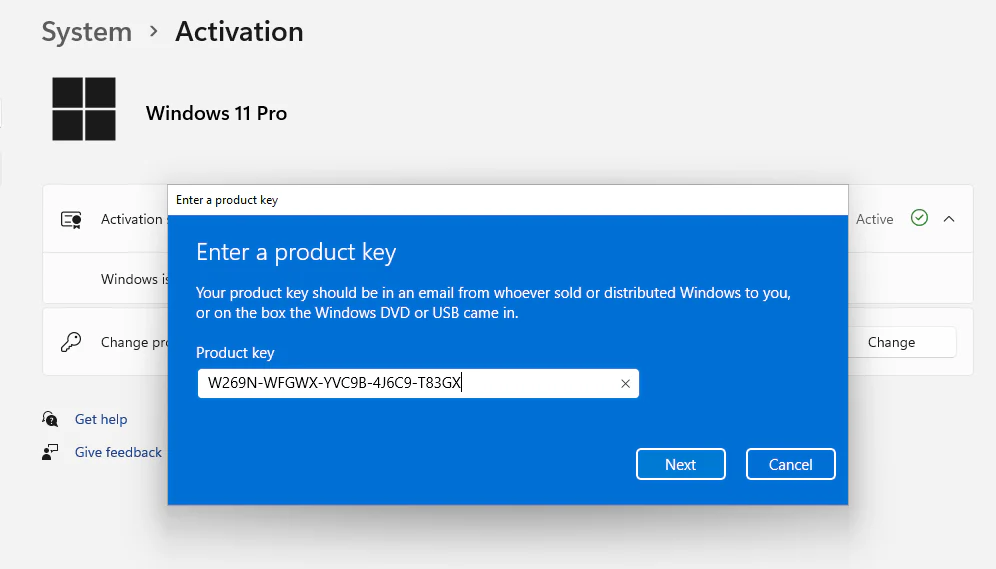
Note: If you do not own an installation DVD or USB drive, please download the respective system setup file from the official Microsoft website, HERE.
Windows 11 Key Overview
Device encryption with BitLocker:Use BitLocker to encrypt your device and protect your data from unauthorized access.
Organize your open windows into perfect grids: Arrange your windows optimally with perfectly aligned grid layouts for more efficient workspace management.
Easily switch between desktops for better organization: Quickly switch between virtual desktops to maintain a clear and structured organization of your tasks and applications.
Enhanced security with Windows: Benefit from advanced protection to ensure the security of your system and data against potential threats.
Windows Information Protection: Ensure that your sensitive information is protected with Windows’ built-in security measures.
Windows 11 Professional provides a modern workspace where you can creatively pursue your passions in a new environment. Renewed Start menu, redesigned taskbar, optimized system tray, improved Action Center, new Settings panel, widgets, virtual desktops – all this makes Windows 11 easy and fun to use. Windows 11 pro product key has all the tools available in the Home version and additional ones, useful in large companies and used by professionals.
Windows 11 is one of the most significant Windows updates of the last decade. Modern, fresh, transparent, and beautiful. From the lock screen to the Start menu. This is what the new windows 11 is about. What you need is closer to you, simplified and powered by the cloud to serve you the applications and documents you currently need.
Microsoft Windows 11 Professional Product Key features:
-
-
- BitLocker device encryption – If your device is lost or stolen, BitLocker puts everything on lockdown, so no one else can access your systems or data.
- Device encryption – If you turn on device encryption, only authorized individuals will be able to access your device and data.
- Find my device – Keep track of your devices – even your digital pen!
- Firewall and network protection – Your Windows device comes with built-in security features to help safeguard against viruses, malware, and ransomware.
- Internet protection – App & Browser control in Windows Security helps protect your device from potentially dangerous apps, files, websites, and downloads.
- Parental controls and protection – Manage screen time, limit access to mature content, and control online purchases when you connect your family’s Microsoft accounts.
- Secure boot – Helps prevent malicious software applications and unauthorized operating systems from loading during the system start-up process.
- Windows Information Protection (WIP) – Helps protect enterprise apps and data against accidental data leaks on enterprise-owned devices and personal devices that employees bring to work.
- Windows Hello – Uses facial recognition, fingerprint, or PIN, for a fast, secure, and password-free way to unlock your compatible Windows devices.Windows Security – View and manage the security and health of your device.
-
Product also includes business management and deployment tools
-
-
- Assigned Access
- Dynamic Provisioning
- Enterprise State Roaming with Azure
- Group Policy
- Kiosk mode setup
- Microsoft Store for Business
- Mobile device management
- Support for Active Directory
- Support for Azure Active Directory
- Windows Update for Business
-
Why would I need a Windows 11 Pro key?
1. To Join a Corporate Network (The #1 Reason)
- Domain Join: Windows 11 Pro allows your PC to join an Active Directory Domain. This is the core of most corporate IT networks. It lets you log in with your company credentials, access shared drives, printers, and have group policies (security settings, software deployments) applied automatically.
- Group Policy Management: IT administrators can finely control security and settings across all company PCs from a central server. Home users don’t have access to the advanced Group Policy Editor.
2. Enhanced Security & Management
- BitLocker Drive Encryption: This is a major one. Pro includes full-disk encryption to protect your data if your laptop is lost or stolen. Windows 11 Home only offers a less comprehensive “Device Encryption” on certain hardware.
- Windows Sandbox: A lightweight, disposable virtual machine that runs on your desktop. Perfect for safely testing unknown software, opening suspicious files, or visiting risky websites without risking your main system.
- Hyper-V: Microsoft’s native hypervisor for creating and running full virtual machines (VMs). Essential for developers, IT pros, and anyone needing to test software in different OS environments (like Linux or older Windows versions).
- Windows Information Protection (WIP): Helps separate personal and corporate data on a single device, preventing accidental data leaks from work apps.
3. For Business & IT Administration
- Remote Desktop (Host): Allows you to connect to your PC remotely from another device (like your home computer accessing your office PC). Windows 11 Home can only initiate connections (client), it cannot host them.
- Assigned Access: Lets you lock a PC down to running only one specific app (e.g., for a kiosk, point-of-sale system, or library terminal).
- Azure Active Directory Join & Cloud Management: For modern businesses using Microsoft 365, Pro devices can be registered directly with Azure AD for secure, cloud-based management.
- Business Store: Access to a private section of the Microsoft Store where an organization can curate and deploy specific apps to its employees.
4. For Developers & Power Users
- Hyper-V (mentioned above) is a crucial tool for developers.
- Greater RAM Support: While both Home and Pro support a massive amount of RAM for most users, Pro officially supports up to 2 TB, whereas Home supports up to 128 GB. This only matters for extreme workstations (e.g., massive data analysis, scientific computing, heavy video production).
- More CPU Cores: Pro supports up to 2 CPU sockets (meaning 2 physical processors), which is a server/workstation feature. Home supports 1 socket.
You probably need to buy a Windows 11 product key if you:
- Are setting up a PC for a business that uses a central server/domain.
- Work from home and your company’s IT policy requires Domain Join or BitLocker.
- Are a developer who needs Hyper-V for virtual machines.
- Are a security-conscious user who wants BitLocker encryption for your laptop’s drive.
- Frequently need to access your main desktop PC remotely from another location.
- Want to test software safely in a Windows Sandbox.
Windows 11 Pro keys range from under $2 on gray-market sites to $199 officially from Microsoft. Third-party sellers offer steep discounts via resold or OEM licenses, but legitimacy varies. Prices fluctuate with promotions and seller ratings.
Windows 11 Key Price Comparison
Warranty Information
Full warranty offered. We guarantee that you will receive a genuine Windows 11 pro product key, or your money back.
Are you a reseller?
If you’re a reseller, email us at contact@yoursoftwarekeys.com, and we’ll send you a tailor-made price list. Let’s work together!

FREQUENTLY ASKED QUESTIONS (FAQs)
- Can you buy Windows 11 Pro?
Yes, you can purchase it. The specific product is a digital license key delivered via email. - Is Windows 11 Pro license a lifetime? Is it a one-time fee? Yes, its a one-time purchase for a “lifetime use” retail license, not a subscription. This is different from an OEM license, which is tied to one device.
- How much does a license cost? The price on YourSoftwareKeys.com ranges from $24.99 to $59.99. For comparison, Microsoft sells Windows 11 Pro directly for $199.99.
💻 System Compatibility and Performance
- How much RAM is needed?
The official minimum is 4 GB. For comfortable use with multiple applications, 8 GB is a more practical baseline, with 16 GB being ideal. - Can I buy Windows 11 Pro key for my old computer?
You can buy it, but your PC must meet the strict system requirements, including a compatible 64-bit CPU with 2+ cores, 4 GB RAM, 64 GB storage, UEFI firmware with Secure Boot, and TPM 2.0. You can check compatibility using Microsoft’s PC Health Check app. - Will Windows 11 slow down my PC?
Performance depends on your hardware. On modern, compatible systems, performance is generally good, and many users report a smooth experience. However, some users on high-end hardware have reported performance issues compared to Windows 10, particularly with UI responsiveness. On older or incompatible hardware, slowdowns are likely. - How old is Windows 11 Pro?
Windows 11 was released in October 2021, making it just over four years old as of early 2026.
🔄 Upgrade Considerations and Features
- What if I don’t upgrade after October 2025?
This refers to the end of support for Windows 10. If you stay on Windows 10, your PC will no longer receive critical security updates, making it more vulnerable. The free upgrade to Windows 11 is still available for eligible PCs. - What are the disadvantages of Windows 11 Pro?
The main considerations are:- Strict Hardware Requirements: Many older PCs cannot officially upgrade.
- User Interface Changes: The centered Start Menu and redesigned context menus require adaptation.
- Potential Performance: As noted, some users report issues.
- Online Account Requirement: A Microsoft account is required for initial setup of Home and Pro for personal use.
Buy Windows 11 Pro Activation Key today and save money

Jim ****** –
Product key activated without issue
Cesar Agusto –
Key works perfect
Anthony Rob –
Received key within minutes, got it to work instantly. Great price and service
Thomas Bellak –
Good, thanks
Willis Sullivans –
Was fast and easy, will use again in the future.
Andrew Willis –
Smooth transaction, will buy again
Justin ******** –
They send me the key just after the purchase. It activates Windows without problems. All perfect
Viktoria ************ –
Super fast and legit!
I received my Windows 11 key within seconds after purchase. Activation was smooth, no issues at all. The instructions were clear, and the whole process took less than a minute. Great service, responsive and trustworthy — highly recommended!
Karla ********** –
Im happy with this purchase.
Henry *********** –
First time hearing bout yoursoftwarekeys, got my first windows 11 key and works amazing. Im so happy i ddint get scammed, i will come back for more keys.
Database sys****** –
Got 6 keys for our company and all work perfect, all retail keys very happy