


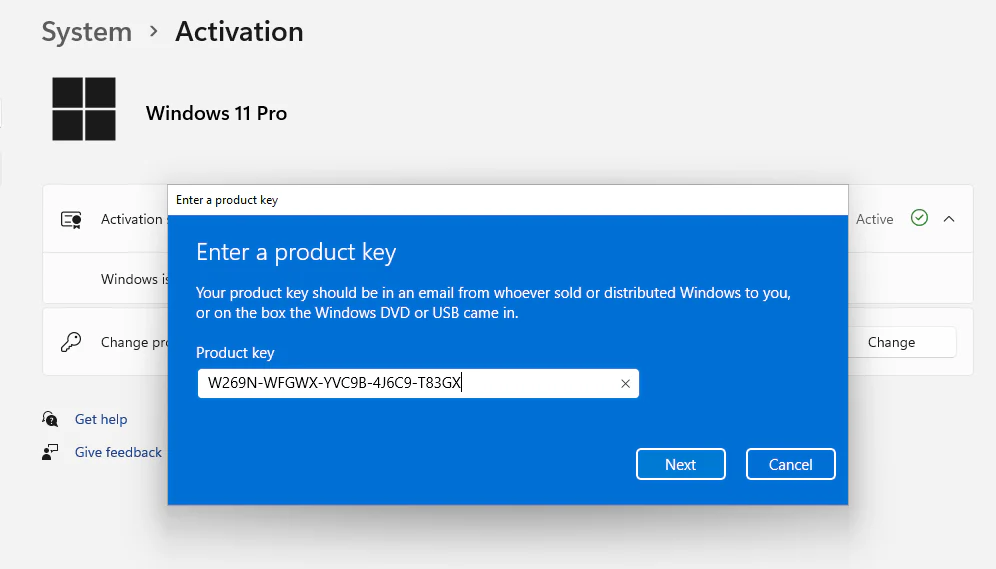
Buy a Windows 11 Pro activation key when you need a genuine license for a business PC, work-from-home setup, or personal computer that needs Pro features like BitLocker, Remote Desktop host, Hyper-V, and domain join. This page is built for buyers searching for a real Windows 11 Pro key with fast delivery and straightforward activation.
Your Windows 11 Pro product key is delivered digitally by email so you can activate quickly without waiting for physical media. If you do not already have installation media, you can download Windows directly from Microsoft and activate it with your purchased key after setup.
When you order from YourSoftwareKeys, you get secure checkout, fast delivery, and support if you need help choosing between Windows 11 Pro, Windows 11 Home, Windows 11 Pro MAK, or Windows 11 Pro OEM.
Bundle Option: Pro Work Bundle
If you also need Office for work, study, or everyday productivity, pair this license with Office 2021 Professional Plus.
- Includes: Windows 11 Pro Activation Key + Office 2021 Professional Plus
- Regular total: $54.98
- Recommended bundle price: $49.99
- Savings: $4.99
This is a practical bundle for freelancers, remote workers, office users, and anyone setting up a ready-to-use Windows productivity PC.
Who Should Buy a Windows 11 Pro Key
- Professionals who need BitLocker drive encryption for stronger device security
- Users who want Remote Desktop host to access their PC from another location
- Businesses that need domain join, Group Policy, or work-managed devices
- Developers and power users who want Hyper-V and advanced virtualization tools
- Anyone upgrading from Home edition to unlock Windows 11 Pro features
Why Buyers Choose Windows 11 Pro
- BitLocker helps protect your files if a device is lost or stolen
- Remote Desktop host lets you connect to your PC from elsewhere
- Hyper-V supports virtual machines for testing and development
- Domain join and Group Policy make Windows 11 Pro a better fit for business environments
- Windows Sandbox helps test apps more safely in an isolated environment
Key Product Details
| Feature | Details |
|---|---|
| Product | Windows 11 Pro activation key |
| License type | Genuine retail license |
| Delivery | Digital delivery by email |
| Activation | Online activation with Microsoft |
| Best for | Business use, advanced security, remote work, and power users |
How to Activate Windows 11 Pro
- Install Windows 11 Pro or open the Activation settings on your PC.
- Enter your purchased Windows 11 Pro product key.
- Complete activation online through Microsoft.
- Restart if prompted and confirm activation in your Windows settings.
If you need a walkthrough, see our How to Activate Windows guide.
Important Notes Before You Buy
- Choose the right edition. This page is for Windows 11 Pro. If you need a simpler home-use edition, review our Windows 11 Home activation key.
- Consider your license type. If you need business deployment across multiple systems, our Windows 11 Pro MAK key may be a better fit.
- OEM and retail are not the same. If you specifically want an OEM option, see our Windows 11 Pro OEM key page.
- Make sure your device supports Windows 11. Confirm hardware compatibility before purchase if you are upgrading older systems.
Related Windows 11 Options
If you are comparing licenses, you may also want to review Windows 11 Home, Windows 11 Pro MAK, Windows 11 Pro OEM, or Windows 11 Pro for Workstations depending on how you plan to activate and use the device.
FAQ
- What is a Windows 11 Pro activation key?
It is a product key used to activate Windows 11 Pro so you can use Pro features such as BitLocker, Remote Desktop host, domain join, and Hyper-V. - Is Windows 11 Pro better than Home?
For business use, remote access, and advanced management features, yes. If you only need basic everyday features, Windows 11 Home may be enough. - How will I receive my key?
Your key is delivered digitally by email after purchase so you can activate quickly. - Can I use this to upgrade from Windows 11 Home?
In many cases, yes, provided your system supports the edition change and activation requirements. Always confirm your current installation and activation state first. - What if I need help with activation?
If you run into issues, contact us and we can help you confirm the right product. We also have a complete step-by-step guide on how to activate Windows covering all methods and error fixes.
If you are ready to buy a Windows 11 Pro key, this product is a strong fit for users who want genuine activation, business-ready features, and fast digital delivery.
Related reading
Step-by-step: How to activate Windows 11 Pro with a product key.


Jim ****** –
Product key activated without issue
Cesar Agusto –
Key works perfect
Anthony Rob –
Received key within minutes, got it to work instantly. Great price and service
Thomas Bellak –
Good, thanks
Willis Sullivans –
Was fast and easy, will use again in the future.
Andrew Willis –
Smooth transaction, will buy again
Justin ******** –
They send me the key just after the purchase. It activates Windows without problems. All perfect
Viktoria ************ –
Super fast and legit!
I received my Windows 11 key within seconds after purchase. Activation was smooth, no issues at all. The instructions were clear, and the whole process took less than a minute. Great service, responsive and trustworthy — highly recommended!
Karla ********** –
Im happy with this purchase.
Henry *********** –
First time hearing bout yoursoftwarekeys, got my first windows 11 key and works amazing. Im so happy i ddint get scammed, i will come back for more keys.
Database sys****** –
Got 6 keys for our company and all work perfect, all retail keys very happy